



 |
|
 | |
 | |
 | |
 | |
 | |
 | |
 | |
|


Icon Generator and Converter
 
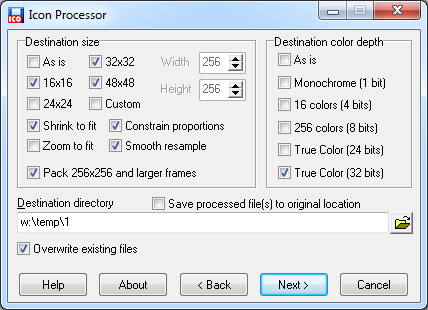
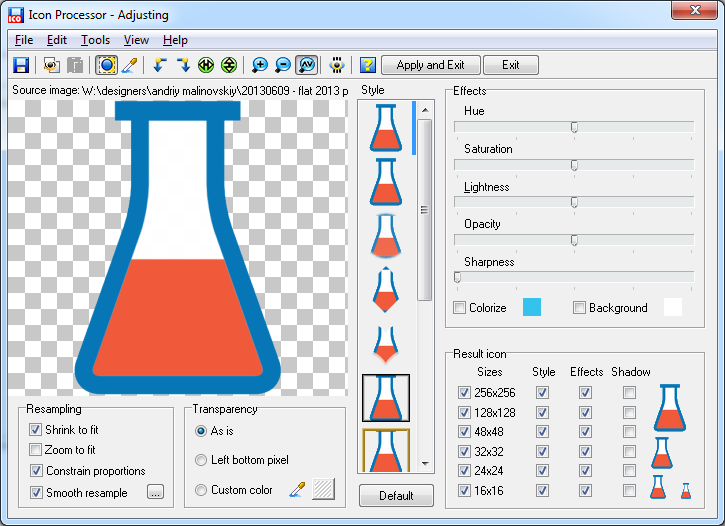 This icon generator uses a step-by-step approach for converting your images into icons. You simply drag and drop entire folders or files into the program window, or add items via the file mini-browser that includes a preview window. You can then choose a size, ranging from 16x16 to 1024x1024, for output. There is an option to have icons shrunk or zoomed to fit. Icon Processor also lets you add transparency or background color from the palette to icons.
Supported formats: ico, icns, cur, ani, bmp, gif, jpeg, jpeg 2000, tiff, png, psd, wmf, wbmp, emf, tga, pcx, xpm, xbm, ai, pdf, svg. System requirements: Windows 95/98/ME/2000/NT/XP/2003/Vista/7/8/10, 12 MB Hard Disk. Trial limitations: nag-screen, 30-day trial period, only 3 files can be converted at once. Download icon generator (6.3 MB):  exe exe
 Order Icon Processor for $19.95 Order Icon Processor for $19.95
Icon Generator Can Convert JPEG and Other Picture Files into Windows Icon FilesIcon Empire introduces a fantastic icon-processing program. Icon Processor will surely liven up your desktop and browsers. With easy to use tools, it allows you to download icons with speed and efficiency.Icon Empire introduces a fantastic icon-processing program. Icon Processor will surely liven up your desktop and browsers. With easy to use tools, it allows you to download toolbar icons with speed and efficiency. It handles a variety of formats, including JPEG, TIF, ANI, and countless others. The icon design convert feature is very practical, and is created to maximize web functionality. From informative sites to business forms, you can effectively convert to icon and vice-versa. Each icon design consists of crisp, clear, and easy to visualize graphics. With first class abilities, it can safely convert family photos, web shots, or digital images to icons. Icon Processor also enables file extraction from folders and sets. This is perfect for centralizing icon sets and image conversion. The icon convert tool facilitates many designs, sizes, and colors. From creative websites to flash animations, direct your web traffic with concise and clear images. You can convert icon sets that will be used on blogs and databases. From smooth photos to various styles, you can even apply effects to enhance your icons. The icon pack is available for download, with a free trial for first time users. This is great software, which allows you to search icons to meet all your needs. The program is also equipped with shadow and semi-transparent tools. Simply drag and drop your files into the processor for quick conversion. The convert to icon feature lets you manage all your files. From icon modification to design, you can easily format your creations to achieve desired results. This includes size, color, file type, and folder modifications. With user-friendly instructions, you will convert your favorite images to icons in no time. The toolbar icons utilize a step-by-step approach to ensure a favorable outcome. From jpg to icon, instantly search icons for e-mail attachment and embedded file links. To streamline the process, Icon Processor includes a compatible mini-browser. This is great for icon previews during development. Once you have chosen a size, simply follow the instructions to convert the icon file. The icon file can then be enhanced with special filters and tools. You can add a background or transparent color from the palette, or integrate soft shadows. No matter your preference, you website will sparkle with these amazing graphics. From symbols and objects to prompts and icons, add a touch of class to and web endeavor. The command line interface, allows you to utilize functions in a timely manner. This results in quick conversion and instant icon placement. The jpg to icon conversion tool is a favorite mode of icon conversion. Since jpegs are widely used, they are perfect for high-end visuals with simple formats. Icon Empire is an industry leader in icon creation. From fast conversion modules to an assortment of styles, download icons that have serviced a broad range of websites. Whether you need business icons or generic symbols, the Icon Processor simply has it all. They are fully compatible with several Windows operating systems. You can purchase icon packs at an amazing price. With so many conversion options, you will always be able to download icons that are visually stunning. This is truly an innovative way to establish an attractive and captivating website.
| ||
|
Copyright © 2005-2022 Icon Empire. All rights reserved. |


|


 More info


